

expresscopy.com > Getting Started > Address List File Specs
Uploading your own Address ListIf you are uploading your own address file or would like to export your addresses from a contact management program, please read our address file specifications below. Acceptable File TypesPlease click below to view and download an example of each file type. |
On this page: Acceptable File Types Printed Address Examples & Options Generic Addressee CASS Certification Ordering Extra Postcards |
Tab Delimited (.txt)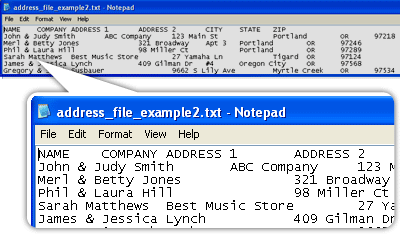 Comma Separated Values (.csv) 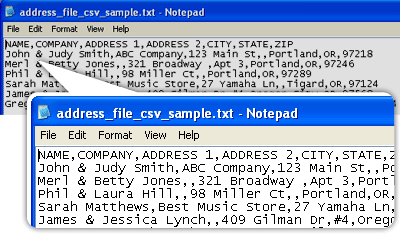
Microsoft Excel (.xls) 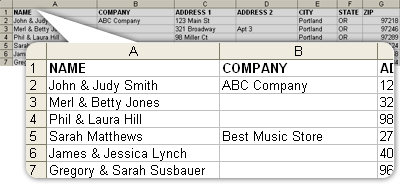
|
Acceptable address list sources:
|
Printed Address Examples, Optional and Required Fields
The only required fields for your address file are street address, city, state and zip code. City, state and zip code can be all in one field or in separate fields. In addition to the required fields, there are also several optional fields.
Optional Generic Addressee
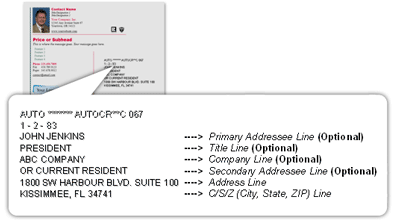
If you would like to add a generic addressee such as “or current resident” to each postcard choose one of these two options: during the order process you can choose to have expresscopy.com add it to each postcard or you can add a generic addressee field to your address list. If you choose to add a generic addressee to your address list, it cannot be in the same field as the name or company fields.
Reasons to add a Generic Addressee: If you would like your postcard to be delivered regardless of the current resident of the address, you must add a generic addressee. Also, less of your postcards will come back undeliverable.
Example: A postcard notifying each household that a new business is in their neighborhood.
Reasons not to add a Generic Addressee: If you would like a particular person/family to receive your postcard, you should not add a generic addressee. For first class mail, if the recipient no longer lives at that address it will be forwarded to their new address based on the National Change of Address (NCOA) information that we receive. For standard (bulk) mail, if the recipient no longer lives at that address the postcards will be discarded by the United States Postal Service.
Example: A postcard inviting your customers to an exclusive event.
CASS Certification
(Only applies to orders for Print + Address + Mail service. Addresses submitted for Print + Address service will not be CASS certified.)
To improve the accuracy of addresses on all pieces mailed by expresscopy.com, USPS™ CASS™ Certification software compares submitted addresses to a constantly updated USPS database of addresses. After the order has been placed, USPS CASS Certification checks all addresses for validity and proper formatting. Invalid and duplicate addresses are removed from your list(s). You will only be charged for the actual quantity of postcards that are printed and mailed. This software does not verify if the intended recipient actually resides at that address or if the property is occupied.What happens if the certified address list does not match the quantity I submitted?
If less certify:
During the checkout process, you will have an option to tell us how you would like your order handled if less than the original quantity certify. You can either choose to proceed with only the certified addresses or choose to have the order placed on hold. Example: Hold my order and contact me only if more than 15% of the original order quantity does not certify.
If more certify:
If you order 100 postcards and 115 certify, we will mail the 100 that you ordered. However, if the certified amount exceeds the original quantity by more than 25%, we will hold the order and contact you for advice.
If you would like to check your addresses (one at a time) for validity, you can do so at http://zip4.usps.com/zip4/welcome.jsp
CASS Certification enables us to maximize deliverability and minimize return of mailed pieces due to invalid addresses. For more information on the USPS CASS system, please visit: https://postalpro.usps.com/certifications/cass
Ordering Extra Postcards
When ordering your postcards you can choose an option to have one postcard mailed to yourself. If you would like to have more than one postcard sent to yourself, there are two ways to do this:
- Add your name and address to your address list as many times as you like. CASS Certification automatically deletes duplicates, so you must write a note in your order stating that the duplicate addresses in your file are intentional. Each of these postcards will have the duplicate address on them.
- Add another item to your order for Print-Only postcards (with the postcards coming directly to you). Since this item is a separate shipment, this item must meet the product-specific minimum; please refer to the lowest quantity available on the pricing guide. If you do not want your postcards to have addresses on them, please choose this option.

